I’m the author of verda-cli and verdagostack at Verda Cloud. This post reflects my personal view, not a company position, on how our CLI evolved into a shared interface for humans, AI agents, and IDE workflows.
Table of contents
Open Table of contents
Why a CLI at the Center
Most people still think of a CLI as a tool for hardcore developers or terminal geeks typing commands by hand. I see it differently. To me, the CLI is becoming one of the interfaces of the future: not just something a human uses in a terminal, but a layer that can also serve AI agents and IDEs.
While building verda-cli for Verda Cloud, I started to feel the CLI had become something bigger than a terminal utility. The same operations a human needs — create an instance, check availability, estimate cost — are also the operations an AI agent needs, and increasingly the operations an IDE workflow needs.
That led me to a simple mental model: one gateway, three interfaces.
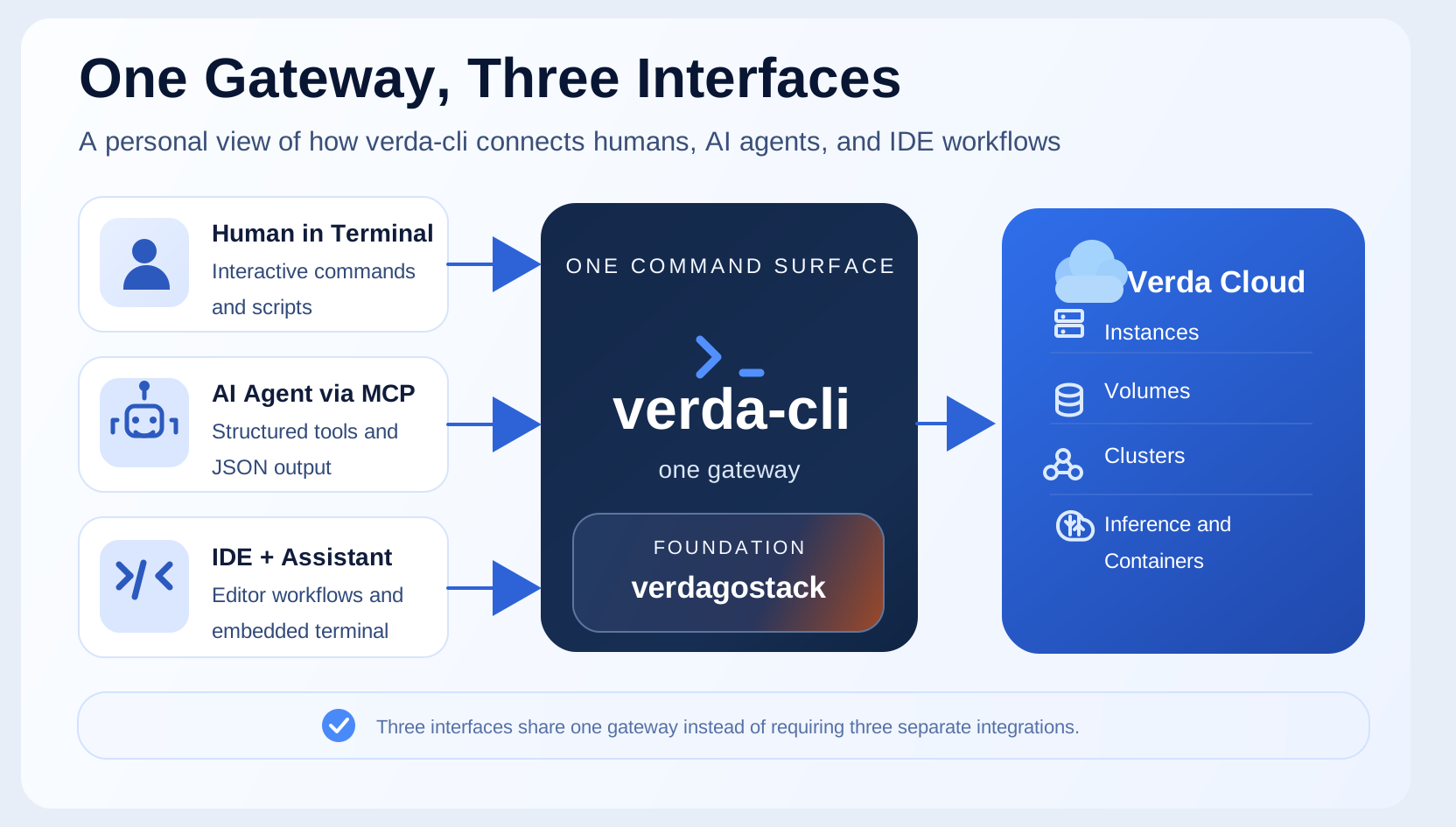
Three entry points. One tool. One command surface. One authentication layer. In my view, that is when a CLI stops being just a developer utility and starts acting more like a control plane.
This is not a brand-new idea. The aws CLI, gcloud, and kubectl already act as unified gateways. What feels different in 2026 is who is using them. It is no longer just humans. AI coding agents — Claude Code, Cursor, Codex — are becoming first-class users of infrastructure tools, and that changes how I think a CLI should be designed.
Three Interfaces, One CLI
Terminal: Interactive and Scriptable
The most direct way to use verda-cli. For interactive use, the CLI provides wizard flows — guided multi-step experiences with progress bars, dynamic choices, and back-navigation. Deploy a GPU VM in 13 steps without memorizing flags.
For automation, the same commands work non-interactively with flags:
# Interactive — wizard guides you
verda vm create

# Scripted — flags for CI/CD pipelines
verda vm create \
  --kind gpu \
  --instance-type 1V100.6V \
  --location FIN-01 \
  --os ubuntu-24.04-cuda-13.0-open-docker \
  --hostname gpu-runner
One command, two modes. The wizard is powered by our TUI wizard engine built on Bubble Tea — the subject of our previous blog post.
AI Agents: MCP and Agent Mode
This is where things get interesting. The CLI includes a built-in MCP (Model Context Protocol) server — a standard that lets AI agents call tools through a structured interface.
{
  "mcpServers": {
    "verda": {
      "command": "verda",
      "args": ["mcp", "serve"]
    }
  }
}
Add this to your AI agent’s config, and it can manage infrastructure through natural language:
"What GPU types are available right now?"
"Deploy a V100 with 100GB storage for my training job"
"How much are my running instances costing me per hour?"
"Shut down the training VM — the job finished"
The agent calls verda-cli tools under the hood. Same authentication, same API, same validation — but the interface is a conversation, not a command line.
For scripts and automation agents that call the CLI directly (without MCP), there’s --agent mode:
verda --agent vm list              # JSON output, no interactive prompts
verda --agent vm create ...        # structured errors for missing flags
--agent mode guarantees machine-readable JSON output and structured error responses — no spinners, no color codes, no interactive prompts that would break a parser.
IDE: Skills, MCP, and Extensibility
Developers live in their IDE. We bring the CLI to them in three ways:
MCP in the IDE — The same MCP server that powers standalone AI agents works inside AI-assisted IDEs. Configure it in Cursor, Claude Code, or any MCP-compatible tool, and your AI coding assistant can manage infrastructure without leaving the editor.
AI coding skills — Reusable skill files that teach AI assistants how to work with Verda and the verdagostack framework. Install a skill, and your assistant knows how to scaffold a new service, configure deployment options, or set up observability — following your team’s patterns.
Terminal inside IDE — The CLI works in any embedded terminal. VS Code, JetBrains, Warp — the interactive wizard, --agent mode, everything works the same.
The key principle: we don’t prescribe how you integrate. MCP for AI-native workflows. Skills for scaffolding and coding assistance. Terminal for direct control. Mix and match.
The Foundation: verdagostack
The diagram shows verdagostack sitting inside verda-cli. It’s our shared Go library — the building blocks that make the CLI possible, and that any Go application can reuse.
Why does this matter for the ecosystem story? Because the CLI isn’t a monolith. It’s assembled from composable packages:
| Package | What it does |
|---|---|
pkg/tui | Prompter and Status interfaces — abstract away the terminal UI backend |
pkg/tui/bubbletea | Bubble Tea backend with 8 built-in themes |
pkg/tui/wizard | The wizard engine — multi-step flows with dependency tracking |
pkg/app | CLI application framework built on Cobra and Viper |
pkg/options | Flag-driven configuration structs with validation |
pkg/log | Structured logging backed by zap |
pkg/otel | OpenTelemetry tracing and metrics |
pkg/server | HTTP, gRPC, and Gin server implementations |
pkg/db | Database constructors — PostgreSQL, CockroachDB, MySQL, Valkey |
The CLI uses pkg/tui, pkg/app, and pkg/options. But the same libraries power backend services too. A team building a gRPC service on Verda Cloud uses pkg/server, pkg/db, and pkg/otel — same patterns, same conventions, same logging format.
This is intentional. When the AI coding skills scaffold a new application, they generate code that uses verdagostack. The patterns are consistent whether you’re building a CLI tool, a web service, or a training pipeline wrapper. One library, many applications.
Where This Is Going: AI Agents as Infrastructure Users
Today, verda-cli is a tool that humans use, with AI agents as a growing secondary interface. The MCP server works. Agent mode works. AI assistants can deploy a VM, check pricing, shut down instances.
But this is just the starting point.
From Assistants to Operators
Right now, an AI agent manages infrastructure because a human asked it to. “Deploy a V100 for my training job.” The human decides what, the agent executes how.
The next step is agents that operate autonomously. Consider an ML training workflow:
- Agent detects a new training job in the queue
- Checks GPU availability and spot pricing across locations
- Deploys the cheapest available instance with the right GPU type
- Attaches storage volumes with the training data
- Starts the training container
- Monitors progress — if the spot instance gets preempted, redeploys elsewhere
- When training completes, saves the model, tears down the instance
- Reports cost and results
No human in the loop for routine decisions. The agent understands the constraints (budget, GPU requirements, data locality) and makes operational choices. The human sets the policy, the agent executes it.
The Platform Is Growing
The right side of our architecture is expanding:
- Instances — GPU and CPU VMs (today)
- Volumes — persistent storage (today)
- Clusters — multi-node GPU clusters for distributed training
- Inference — model serving endpoints with autoscaling
- Containers — managed container workloads
Each new resource type becomes available through the same gateway. Add it to the API, expose it in the CLI, and every interface — terminal, AI agent, IDE — gets access automatically. An agent that knows how to deploy an instance today will know how to deploy an inference endpoint tomorrow, using the same patterns.
Why the CLI Is the Right Center
There’s a practical reason the CLI sits at the center: AI agents are exceptionally good at using CLI tools.
An API requires understanding authentication flows, request/response schemas, pagination, error codes. A web console requires visual understanding and pixel-level interaction. But a CLI? An AI agent already knows how to run commands, read --help output, parse JSON, and chain operations with pipes and scripts. CLI tools are text in, text out — the native language of language models.
This is why MCP works so well. The protocol exposes CLI commands as structured tools, but the mental model is the same: call a command, get a result, decide what to do next. An agent that can read verda instance-types --gpu output can reason about pricing. An agent that can run verda availability --location FIN-01 can make deployment decisions.
And the CLI carries domain knowledge that a raw API doesn’t:
- Wizard logic — the CLI knows spot instances don’t need contracts, image choices depend on instance type, storage pricing varies by location
- Authentication management — profiles, credential resolution, token refresh. The agent inherits all of this
- Composability — CLI commands chain naturally. An agent combines
verda availability,verda vm create, andverda sshinto a workflow without building custom API integration - Structured error handling —
--agentmode returns machine-readable errors that tell the agent exactly what went wrong and how to fix it
AI agents don’t need a special API. They need good CLI tools — well-documented, consistent, with structured output. That’s what we optimize for.
The Developer Experience Loop
The full picture connects development and deployment:
- Developer writes code in their IDE with AI assistance
- AI assistant uses verdagostack skills to scaffold services following team patterns
- When ready to deploy, the same AI assistant uses MCP to provision infrastructure
- The CLI handles the complexity — GPU selection, pricing, availability, networking
- The service runs on Verda Cloud with the same observability stack (logging, tracing, metrics) that verdagostack provides
- AI agents monitor, scale, and manage the running infrastructure
Code to cloud, with AI at every step. The CLI is the bridge.
Looking Ahead
We started with a simple goal: make it easy to manage GPU infrastructure from the terminal. That goal grew into an ecosystem — a shared library, an interactive wizard engine, MCP integration, AI coding skills, and an extensible platform that serves humans and AI agents through the same interface.
The boundary between “developer tool” and “AI agent tool” is disappearing. A well-designed CLI doesn’t have to choose between them. Make the commands consistent, the output structured, the errors actionable, and both humans and agents will use it effectively.
verda-cli is open source. The wizard engine and shared libraries ship as part of verdagostack. If you’re building cloud infrastructure tooling — or thinking about how to make your CLI AI-agent-friendly — we’d love to hear from you.